> For the complete documentation index, see [llms.txt](https://docs.vespr.xyz/vespr/llms.txt). Markdown versions of documentation pages are available by appending `.md` to page URLs; this page is available as [Markdown](https://docs.vespr.xyz/vespr/user-guide/getting-started/import-an-existing-wallet.md).
# Import an Existing Wallet
Restore a Cardano wallet in VESPR with its 12, 15, 18 or 24-word recovery phrase, move from another Cardano wallet, and get your wallets back on a new phone.
You can restore a Cardano software wallet from its recovery phrase, with the exceptions listed below. VESPR accepts recovery phrases of **12, 15, 18 or 24 words** from the English word list.
{% hint style="danger" %}
**Never type a hardware wallet's recovery phrase into VESPR.** To use a Ledger or Keystone, [connect it](/vespr/user-guide/getting-started/connect-a-hardware-wallet.md) instead. If you enter its phrase here, VESPR creates an ordinary software wallet from it, and your keys are no longer protected by the device.
{% endhint %}
## Restore a wallet
{% tabs %}
{% tab title="First time in VESPR" %}
1. On the welcome screen, tap **Restore wallet**. If you haven't accepted the Terms and Privacy Policy yet, VESPR asks you to accept them first.
Tap Restore wallet.
2. On the mobile app, **Secure your wallet** asks whether to unlock VESPR with your phone's own unlock (**Enable device unlock?**). Make your choice and tap **Continue**. The browser extension skips this step.
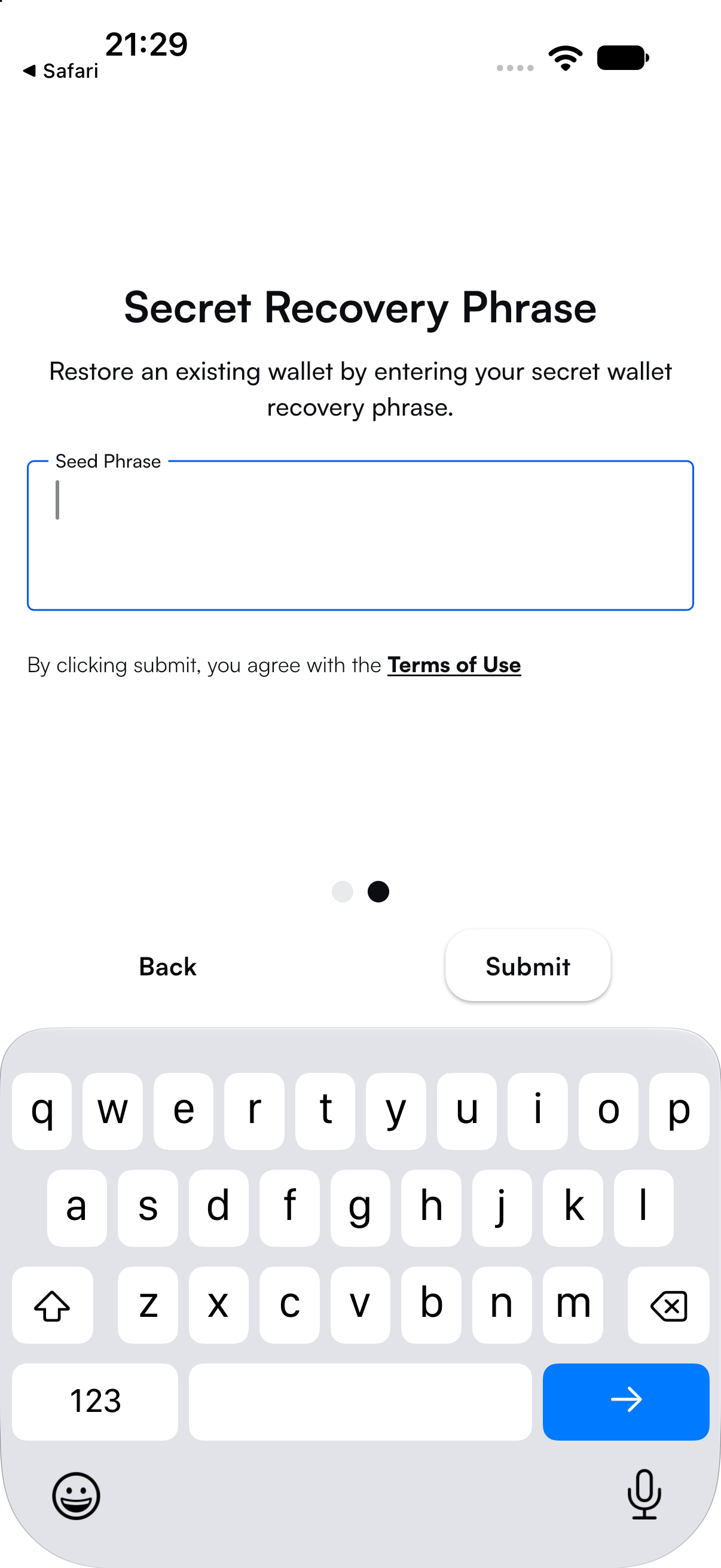
3. On **Secret Recovery Phrase**, enter your words in order, separated by spaces, and tap **Submit**.
In the browser extension, VESPR then asks you to create a password (**Create your password**) the first time, or to enter your password.
{% endtab %}
{% tab title="Adding to existing wallets" %}
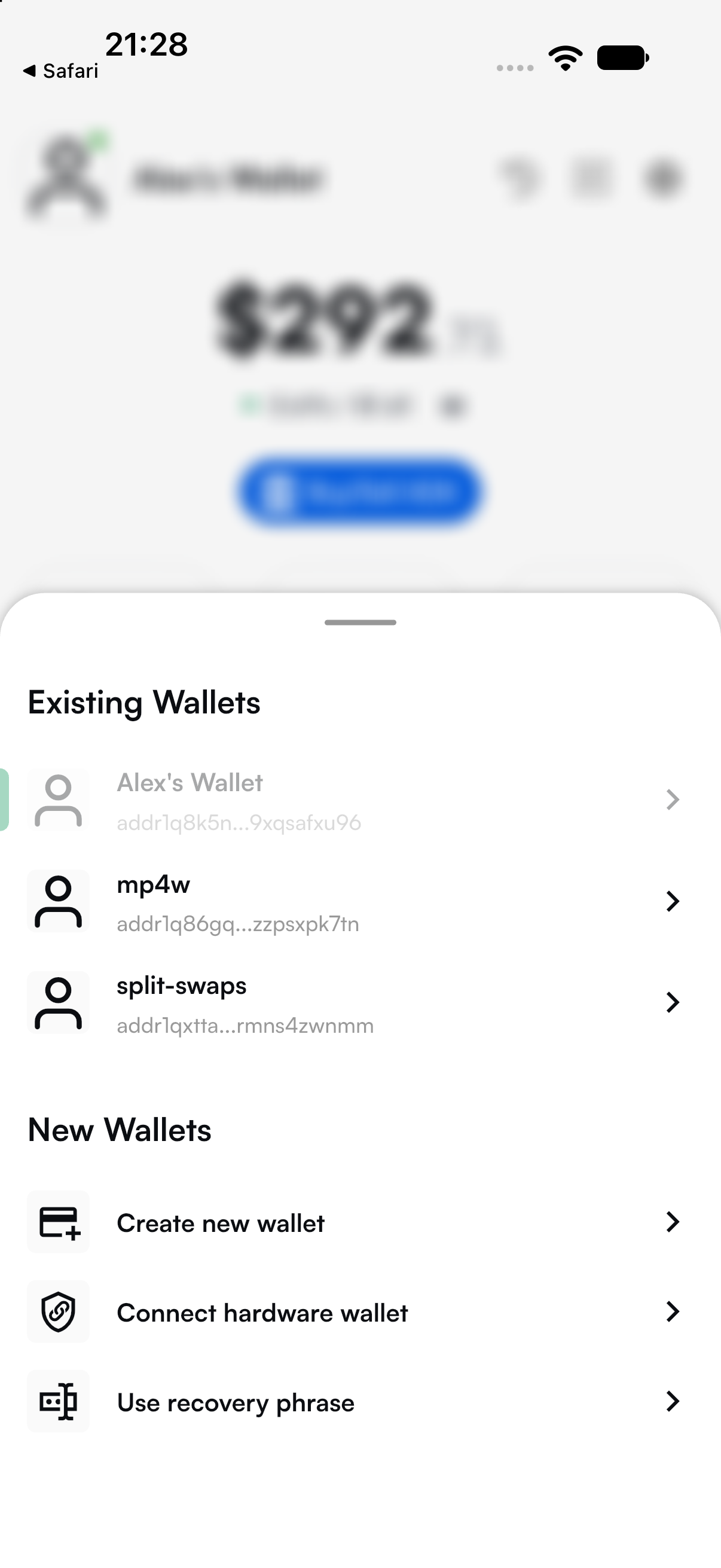
1. Tap your wallet's picture at the top left of the home screen (or go to **Settings** → **Change Account**).
2. Under **New Wallets**, tap **Use recovery phrase**.
3. On the mobile app, **Secure your wallet** asks whether to use your phone's own unlock (**Enable device unlock?**). Make your choice and tap **Continue**. The browser extension skips this step.
4. On **Secret Recovery Phrase**, enter your words in order, separated by spaces, and tap **Submit**.
In the browser extension, VESPR then asks you to create a password (**Create your password**) the first time, or to enter your password.
Under New Wallets, tap Use recovery phrase.
{% endtab %}
{% endtabs %}
Enter your words in order and tap Submit.
VESPR confirms with **Your wallet was successfully restored!** and then loads the wallet's balance and history from the Cardano blockchain. While it does, a spinner shows at the top of the home screen: tap it to see **Your wallet is syncing**.
A restored wallet counts as backed up, so VESPR doesn't ask you to back it up again. Keep the phrase you restored from safe: it is still the only way to get this wallet back.
### If VESPR doesn't accept the phrase
* **"The recovery phrase needs to be 12, 15, 18 or 24 words"**: check that you entered every word, and no extra ones.
* **"The recovery phrase contains the following invalid words"**: those words aren't in the English recovery-phrase word list. Check their spelling. While you type, VESPR shows words it recognises in green and others in red. Phrases in other languages aren't supported.
* **"Invalid recovery phrase checksum"**: every word is valid, but the phrase as a whole isn't. Check each word and the order of the words.
## Moving from another Cardano wallet
VESPR restores the **first account** of a recovery phrase, using the standard derivation of Cardano software wallets. A recovery phrase from a current software wallet such as Eternl, Lace, Yoroi or Daedalus opens the same first account in VESPR, with the same staking key, pool delegation and rewards.
VESPR gives each wallet one receive address. If your old wallet gave you a new address for every payment, VESPR still finds the funds on that account's other addresses (those that share its staking key) and can spend them.
VESPR can't open:
* **Other accounts.** If your old wallet has a second or third account (Account 1, Account 2 and so on), VESPR doesn't see the funds in it. Send them to the first account, or straight to your VESPR wallet, from the old wallet.
* **Phrases protected by an extra passphrase** (sometimes called a 25th word).
* **Legacy Byron-era wallets**, such as old Daedalus wallets with a 12-word phrase. Send the funds to a current wallet first.
* **Addresses without a staking part** (enterprise addresses).
Don't type a hardware wallet's recovery phrase into VESPR either: connect the device instead, as explained above. A Ledger's phrase opens a different wallet in VESPR.
VESPR has no private-key or watch-only import. To keep funds separate, create more wallets: VESPR doesn't use sub-accounts.
## Restore or transfer?
Restoring doesn't move any funds. It gives VESPR the same keys as your old wallet, so both apps control the same funds and show the same balance. You can keep using both.
To move to a new recovery phrase instead, transfer your funds:
1. [Create a new wallet](/vespr/user-guide/getting-started/create-a-wallet.md) in VESPR and [back up its recovery phrase](/vespr/user-guide/the-basics/backup-your-recovery-phrase.md).
2. In your old wallet, withdraw your staking rewards. Since the Plomin upgrade, that needs a vote delegation: see [Staking](/vespr/user-guide/the-basics/staking.md#rewards-and-your-balance). If you won't stake with the old wallet any more, unstake it there to get its 2 ADA staking deposit back.
3. Send your ADA, tokens and NFTs from the old wallet to your new VESPR wallet's address: see [Receive ADA](/vespr/user-guide/the-basics/receive-ada.md).
4. In VESPR, [register the new wallet for staking](/vespr/user-guide/the-basics/staking/registering-a-new-wallet-for-staking.md) if you want to keep earning rewards.
### If your recovery phrase may be exposed
If someone else may have your recovery phrase, they can move your funds at any time. Move them first, and tidy up later:
1. [Create a new wallet](/vespr/user-guide/getting-started/create-a-wallet.md) in VESPR and [back up its recovery phrase](/vespr/user-guide/the-basics/backup-your-recovery-phrase.md).
2. Straight away, send everything you can spend (ADA, tokens and NFTs) from the old wallet to the new wallet's address. Don't withdraw rewards or unstake first. If you can no longer open the old wallet, restore its phrase in VESPR just to move the funds out, then remove it with **Settings** → **Remove current wallet**.
3. Only then, if the old wallet still has rewards or a staking deposit, withdraw them and send them to the new wallet too. Whoever has the phrase can also take them, so they may already be gone.
4. Never use the old recovery phrase again.
{% hint style="info" %}
VESPR doesn't stop you from restoring the same phrase twice, and then shows it as two wallets. To remove one, select it and go to **Settings** → **Remove current wallet**. Removing a wallet only removes it from VESPR: the funds stay on the blockchain, and you can restore the wallet again with its recovery phrase.
{% endhint %}
## New phone or reinstall
VESPR encrypts your wallets with a key that stays in your phone's secure storage and is never copied to another device. Phone-to-phone transfers (such as Quick Start on iPhone or Android's data transfer) and iCloud or Google backups can copy VESPR's app data, but not that key. On the new phone, VESPR can't decrypt those wallets, so they can't be opened. Uninstalling VESPR deletes them from the phone. Your funds aren't affected: they are on the Cardano blockchain.
{% hint style="danger" %}
**Moving to a new phone doesn't move your wallets.** The only ways to get them back are each wallet's recovery phrase, or the old phone while VESPR is still on it. **Before you switch phones**, back up each wallet's recovery phrase from **Settings** → **Recovery Phrase** on your old phone. Don't reset the old phone or uninstall VESPR from it until you have.
{% endhint %}
To get your wallets back, install VESPR and restore each wallet with its recovery phrase, as explained above. Reconnect hardware wallets with **Connect hardware wallet**.
If you moved your data to a new phone, VESPR may show **Phone Migration Detected**. It lists each wallet it can no longer unlock, with its receive address (tap an address to copy it). When you tap **I understand**, VESPR removes those wallets from the app and restarts, ready for you to restore them.
## My balance is missing after restoring
* **Wait for the sync to finish.** The spinner at the top of the home screen shows that VESPR is still loading the wallet.
* **Check the network.** Go to **Settings** → **Active Network** and choose **Cardano Mainnet**. On a test network, the row shows **You are currently on a test network**.
* **Check which account the funds are in** in your old wallet. VESPR only opens the first account.
* **Check the phrase itself.** A phrase from a Ledger, a legacy Byron wallet or a wallet with an extra passphrase opens a different, usually empty, wallet in VESPR.